Print
Launching eCase Redact
eCase Redact can be used to redact documents or emails, but first the documents need to be converted into a portable document format (PDF). Follow the steps below to launch eCase Redact.
- Log into eCase and go to the case where you would like to redact a document.
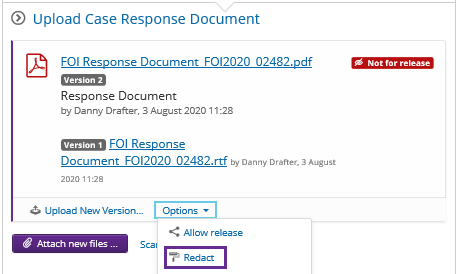
- In the case, locate the document you would like to redact, either in the Documents section or via the Prepare a Response screen, Upload Case Response document section.
- Select a document that has been converted into a PDF, or click on the Options link and select Convert to PDF.
- Once the document has been converted to PDF, select the Options link again and choose the Redact link. eCase Redact opens.