Print
How to add a Ministerial Role
Minister roles are added to eCase so that they can be assigned during Ministerial Correspondence and Parliamentary Questions, for example the Secretary of State per Department. Each ministerial role will have a start date, with eCase tracking when a Minister starts in the role and finishes in the role. Reports can be run on cases that are assigned to that ministerial role, regardless of which member is in the role during the report time period, or reports can be run for a specific Minister across all roles they have held.
To add a ministerial role, follow the steps below.
- Select the eCase More menu, then Ministers in the Reference section.
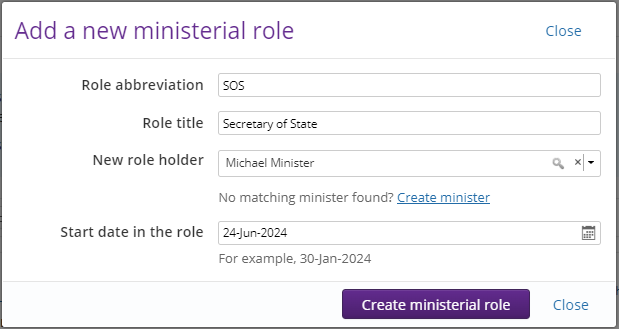
- Select the + Add ministerial role button, the Add a new ministerial role pop up window appears.
- In the Role abbreviation field, type in free format text that will be used to identify the Role title, for example SOS for Secretary of State. The abbreviation is used in reports and Digest Emails to identify the ministerial role. Alpha, numeric and special characters can be used, with a maximum of 20 characters.
- Enter the Role title of the ministerial role.
- Add the name of the Minister in the New role holder field. Start to enter the name of the Minister and a list of matching Ministers will appear. Select the name of the Minster to add it to the field.
NOTE If the Minister is not available, select the Create minister link to create the Minister’s details on eCase. Refer to the help page How to add a Minister - In the Start date in the role field, select the calendar icon to choose the date the Minister started in the role.
- Select the
Create ministerial role button to create the new ministerial role. A ministerial role card will be created where you can see the role abbreviation, the role title, the current role holder and when they have held the role since.

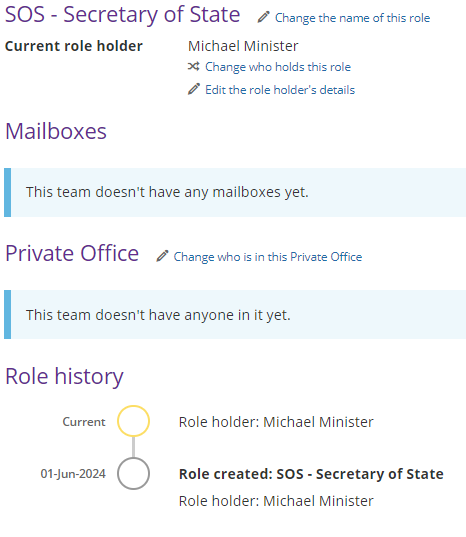
To view the ministerial role, select the name of the ministerial role. You have the option to:
- Change the name of the role
- Change who holds the role
- Edit the role holder's details
- Add a new Minister to eCase
- Review the Minister and Assistant Private Secretary emails associated to the role
- Update the user in the Private Office for this ministerial role