
Work in Progress
For some, when a case is allocated to a drafter at the Create Draft stage, they will see the Work In Progress icon. This is a tick box field that allows the drafter to indicate when they have started work on a case. If a drafter doesn’t tick the Work In Progress tick box, it will automatically be ticked when a drafter links a case, adds a case note, creates a contribution or QA request, downloads a response document template or uploads a response document.
|
If the Work in Progress flag is… |
Then… |
|
Not ticked |
|
|
Ticked |
|
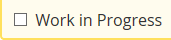

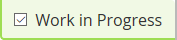

For the drafter, the icons on the Workbasket above the Case Reference Number visually identifies if a case has been started. The Case Search screen can also be used. Add the Drafter Status field to the Case Search screen by clicking on the Choose Fields link. You then have the choice to search for cases that are Work in Progress or Work not Started.