
Print
How to add a mandatory clearance
To add a mandatory clearance to the case, follow the steps below.
- Sign into eCase. Refer to the How to Sign into eCase section.
- Go to your Workbasket and click on the Manage link for the case that you would like to add a Mandatory Clearance to.
- Click on the Mandatory Clearances (2) link on the left menu. The number in brackets indicates how many Mandatory Clearances are already set for the case.
- If you want to add yourself to the Mandatory Clearances
list, then click on the Add Me button. This
will automatically add you to the list.

- To add additional people or teams to the list, click on the Add
Mandatory Clearance button. Only one option can be chosen at a time.
Field Description QA Type Using the drop down arrow, select one of the QA Types. 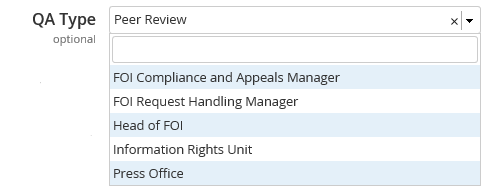
TIP anyone who has the Receive Peer Review QAs privilege on their user account, will be able to conduct a Peer Review. Anyone with the Receive Information Rights Unit QAs privilege on their user account will appear under the Information Rights Unit type, and anyone with the Receive Press Office QAs privilege on their user account will appear under the Press Office type. If you select a QA Type, you do not need to specify who within that group does a QA, just that someone from that team needs to be requested to complete a QA.QA User in Team Using the drop down arrow, select a team. When you request a QA, then select someone from that team to do a QA. Specific Person Choose a specific person from the drop down list.
Once an option is chosen, click on the Add Mandatory Clearance button
When the case is viewed, a message appears at the top of the Case Details screen to highlight that Mandatory Clearances are required. Click on the View Mandatory clearances link to view the list.

As the case progresses and the response document is drafted, a request for a Quality Assurance needs to be sent to everyone added as a Mandatory Clearance. When the Quality Assurance is accepted, the Mandatory Clearance status will be set as Complete. When all of the Mandatory Clearances are set to complete, the response can be sent to the correspondent and the case closed.