
eCase Help
  • Home
  • Create a New Case
  • Allocate and Manage a Case
  • Contribute to a Case
    • New Contribution Request
    • New Record-only Contribution
    • Completed Contributions
    • Respond to a Contribution Request
      • Access a Case
      • Contribution Page
      • Submitting your Contribution
      • Reply to All email Request
  • Respond to a Case
  • Quality Assurance
  • Close a Case
  • Appeals
  • Search, Statistics and Reports
  • Additional Case Types
  • System Management
  • eCase Features and Benefits
  • Register
  • Workbasket Overview
  • Log Out
  • eCase Support
  • Batch Responses
  • eCase Accessibility Statement
  • SAML Single Sign On
  • IP Whitelist
  • eCase Online Learning
  • Webform Submissions
  • eCase Automate
  • Onboarding eCase
  • Did you Know?
Print

Contribution Page

The Contribution section provides the contributor with all of the details about the case.

  • Case reference number
  • Summary of the email sent to you
  • List of people working on the case
  • Any documents or notes that are relevant to the case
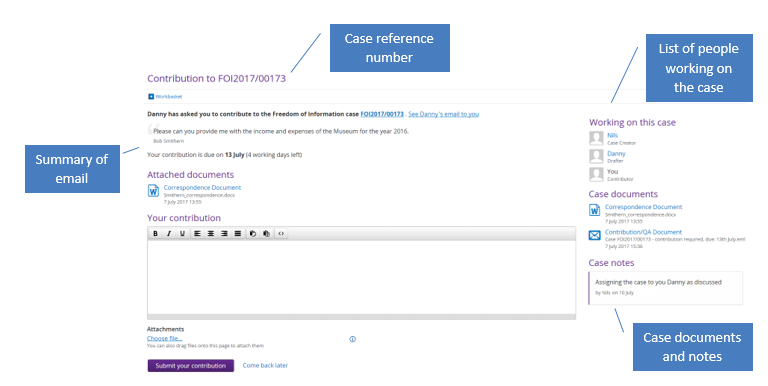
Contribution page


NOTE If the contribution has been assigned to a Team, the team member who will respond to the contribution will see the Take Ownership button to access the contribution page.

Access a Case

Submitting your Contribution

eCase Online Learning
Accessibility Statement

Submitting contribution

Draft a response

Request a QA

FOI Outcome

Notes

Documents

Contact Us

support@ecase.co.uk

Fivium

© Fivium Limited