
Completed contributions
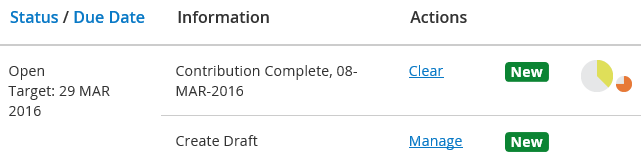
When contributions are complete, your Workbasket will show the following information.
|
Field |
Description |
|
Status/Due Date |
Shows that the status is still open and the target date for closing the case. |
|
Information |
Shows two entries:
|
|
Actions |
|
 |
Identifies that the case is new or updated in your Workbasket. Click on the |
 |
The drafter clock (small clock on the right), identifies how long you have left to complete the case, for example to draft a response and get the response quality checked. |
If a contributor has replied via email and copied the unique contribution email into their response, for example CaseReferenceNumber/CON1@your-eCase where CON1 relates to the contribution request number 1 and ‘your-eCase’ is the name of your eCase domain, then the drafter will receive an email stating that the contributor
has sent a response. A copy of the
response email will be attached. The contribution response email will be attached to the
Contribution and will be available in the Documents section.
If a contributor replies via eCase, the drafter will receive an email stating that the contribution
has been completed and will provide a link to the case. The drafter will still see the
Contribution Complete information on their Workbasket. If a document was attached to this response, the drafter has the option to set the document as a response document for the case.
- On the Workbasket, click on the Manage link.
- Click on the Contributions/QA link on the left menu and go to the contribution that has the document attached that you would like to use as a response document.
- Next to the document, click on the drop down arrow and select the Set as response document link.
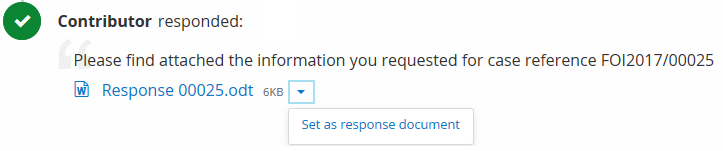
- Click on the OK button if you would like to set the document as a response document. The drop down link changes to a Response document icon. This indicates that the document attached to the contribution has been selected to be a response document for the case.

NOTE if multiple contributions have been sent out requesting information, and the name of the attached document is the same, eCase will ask you if you would like to replace the current version of the response document with the new version of the file or set this document as a new response document. If you do not want to do either, the document will be saved onto the case as a Contribution/QA Document.