
Print
How to record the FOI or DPR Outcome
For statistical purposes, each FOI or DPR request must have a case outcome logged. All details of the case must be complete as this is the last stage in the process.
To log a case outcome, follow the steps below.
- Sign into eCase. Refer to the How to Sign into eCase section.
- Go to your Workbasket and click on the Manage link for the case that requires an outcome to be logged.
- Click on the FOI Outcome / Outcome link on the left menu. The Outcome screen opens.
- The Overall Outcome options are available. Select the Outcome that you require.
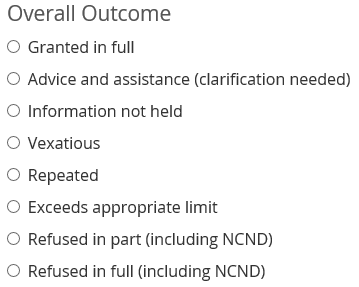
NOTE If you select Refused in part or Refused in full, the exemptions and exceptions become available. - If you select an Outcome other than Refused in part/full, then you don't need to select any exemptions or exceptions. You can progress to completing the Outcome Information.
- If you have refused in part, full or can neither confirm nor deny (NCND) to answer some of the request, the Exemptions and Exemption Sub-Sections become available.
If the case is an FOI case, the EIR exceptions are hidden. Click on the Click here to show EIR exceptions link to show these exceptions.
NOTE to hide the EIR Exceptions, click on the Remove EIR exceptions link.If the case is fully or mostly EIR, you have the option to change the case Request Category to EIR by clicking on the change the case type to EIR link. The EIR Exceptions will then appear.
NOTE to change the case back to an FOI case, click on the revert it to fully or mostly FOI link.Complete the exemption/exception details for the case. - Complete the Outcome Information.
Field Description Data set provided If you have provided some data, select Yes.
If no data has been provided, select No.Simultaneous release Select Yes or No as to whether an immediate release of the information requested is required. Clearances Optional: this is a free format field to enter in details of any clearances obtained to release the information. Notes Optional: enter in any notes. - Proceed to close the case. Refer to the How to close a case section.