Print
How to Complete an ICO Appeal
Once an ICO Appeal case has been created and allocated to a reviewer, they will see the following in their Workbasket.

|
Field |
Description |
|
Case Ref |
The ICO Appeal will have a case reference number starting with ICO. Hover over the speech bubble to see the appeal details. |
|
Case Type/Case Title |
The case type states that this is an FOI ICO Appeal and will state the specific FOI case type. |
| Information | The ICO Appeal case is a Quick Case which means it can be closed at any stage of the process. The case can be tracked for statistical purposes, but there is no formal workflow. |
|
Actions |
Click on the Manage link to access the ICO Appeal case. |
- Sign into eCase. Refer to the How to Sign into eCase section.
- Go to your Workbasket and click on the Manage link for the ICO Appeal case.
- On the Case Details page, scroll down to the Review Outcomes section. If any FOI Outcomes were added on the original FOI case type or on the Internal Review, these can be seen in this section. Record which outcomes or exemptions are being appealed by placing a tick in the Appealed tick box.
NOTE The Review Decision will be updated once the review has been completed.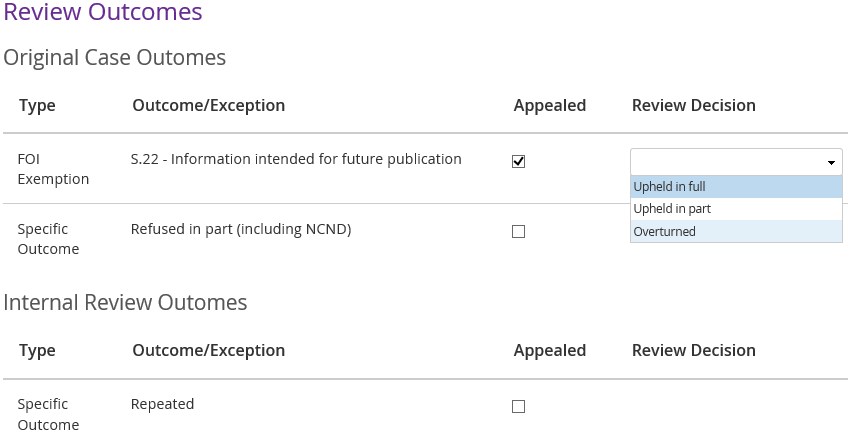
- Optional: if required,
send the correspondent an
acknowledgement, or if more details are
required, send a
clarifiaction email or letter.
- Review the case. If you require further contributions to the case, go to the Contributions/QAs screen.
Refer to the contribute to a case section on how to request a contribution. - Click on the Prepare a Response link to complete
the response document for the ICO case.
- Complete the Review
Decision
on the Case Details page. Click on the
drop down arrow next to each of the appealed outcomes or exceptions and select
one of the options:
- Upheld in full
- Upheld in part
- Overturned - In the Outcomes
added in current review
field, add in any new outcomes that have been
added as part of the appeal.
Step Action 1 Click on the + Add Outcome/FOI/EIR button. 2 Click on the Type drop down arrow and select one of the outcome types:
· Specific Outcome
· FOI Exemption
· EIR Exception3 Click on the Outcome/Exemption drop down arrow and select the relevant outcome.
NOTE to add more repeat steps 1-3. If you want to delete an outcome, click on the delete icon. - To complete the
ICO Appeal response, follow the steps in the
Upload Response Document screen and the send response screen. The response can be
seen in the
Correspondence section of the Case Details screen.
A copy of the email will be available in the
Documents link.
- Once the response
has been sent, close the appeal by clicking on the Close Case button. The Close Case pop up window appears.
- Select the
relevant
Close Type from the drop down arrow.

· No Response Necessary – the Internal Review did not require a response. - Select the Appeal Outcome by clicking on the drop down arrow.
- Refused - no internal review
- Withdrawn by appellant
- Information resolution
- Decision notice issued - In the Review
Decision
drop down, select whether the review has Upheld in
full
, Upheld in part or Overturned the
decision.
- Optional: add in
any
Close Notes that are required about the closure of the
review.
NOTE If you have selected No Response Necessary, then the Close Notes field is mandatory. - To close the ICO Appeal case, click on the Close Case button.
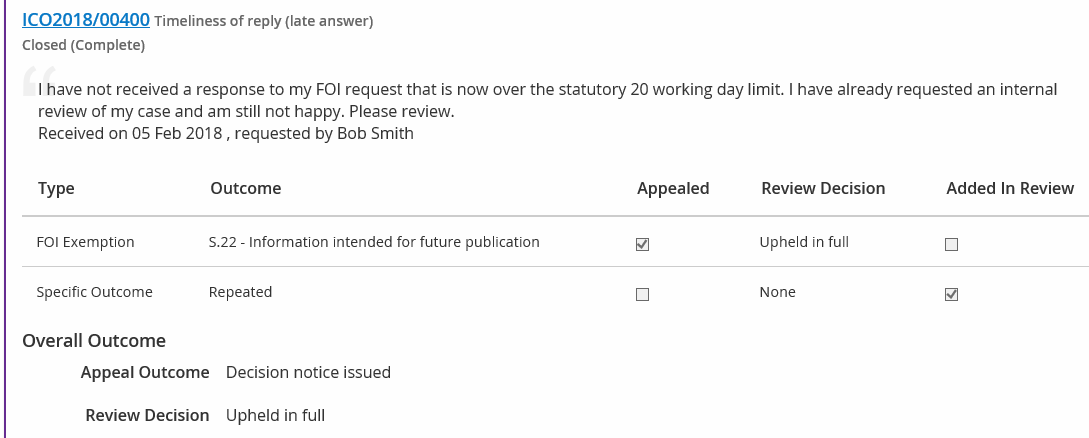
The ICO Appeal details are recorded on the original FOI case. Firstly, a record of the number of Reviews & Appeals will appear under the FOI Case Reference Number.
The ICO Appeal decision will also be recorded on the Reviews & Appeals link. Click on the ICO Appeal case reference number to view all notes and documents that are related to the appeal.