Print
Release Ownership
As a Hub coordinator, you have the ability to release ownership of a case back to the Hub team. You may use this to balance the work flow within the team, or reassign cases back to the Hub if you haven’t started a case and you will be out of the office.
To release ownership, follow the steps below.
- Click
on the Manage
- On
the Hub Allocation tool
bar select the Release Ownership button. A warning message appears to ask if you would
like to release ownership of the case.
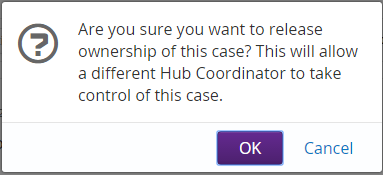
- Click on the OK