Workbasket screen
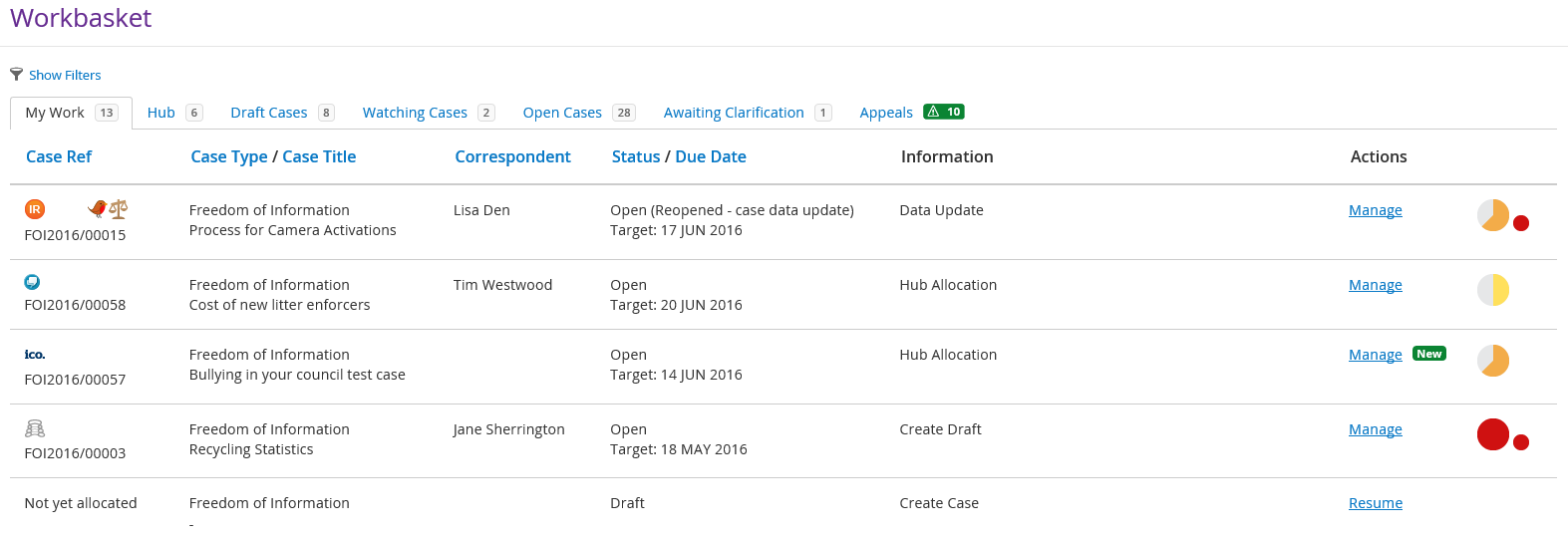
The main Workbasket area provides you with an overview of the cases that are assigned to you.
|
Field |
Description |
||||||||||||||||||||||||||||||||
|
Case Ref |
Each request logged onto eCase will be provided with a unique reference number in the format xxxYYYY/nnnnn, where xxx is the type of request, for example freedom of information, then the year and then the unique number in that year. For example a freedom of information request would be: FOI2016/00027 Above the case reference number, icons may become visible.
|
||||||||||||||||||||||||||||||||
|
Case Type / Case Title |
Type of case, for example freedom of information or environmental information requests with a description of the case from the Case Title field. |
||||||||||||||||||||||||||||||||
|
Correspondent |
The name of the person/organisation requesting the information. |
||||||||||||||||||||||||||||||||
|
Status / Due Date |
|
||||||||||||||||||||||||||||||||
|
Assignee |
For any Workbasket tab that is not your My Work tab, the Assignee column becomes available. This identifies which team member is currently allocated to the case.
|
||||||||||||||||||||||||||||||||
| Information |
The stage at which the case is at. It will indicate the tool bar options that are available on the screens as the case progresses.
|
||||||||||||||||||||||||||||||||
| Actions | The actions column will provide you with various levels of access
to the case.
|
||||||||||||||||||||||||||||||||
 |
Highlights a new case in your Workbasket. | ||||||||||||||||||||||||||||||||
 |
Two clocks. The first highlights the time available on the case, the second highlights the time available for the drafter to gather all of the information required to respond to the case. | ||||||||||||||||||||||||||||||||
|
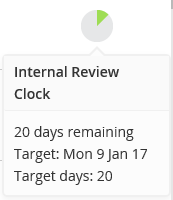
When an Internal Review is allocated to you to investigate, an Internal Review clock appears showing you the 20 working day service level and the number of days remaining to investigate the Internal Review. |