
Print
Configure eCase IdP Settings
To complete the setup, you will need to configure eCase to recognise your AD FS server as a SAML Identity Provider on the SAML Settings page in eCase. eCase requires three values for token signing:
Contents
IdP Endpoint URL
To determine your IdP Endpoint URL, follow the steps below:
- Select the Endpoints folder in the AD FS management tool.
- Locate the endpoint with a Type of SAML2.0/WS-Federation.
- Append the path to the domain of your AD FS server. This is your IdP Endpoint URL. For example, if your server is "https://adfs.minstryofsupply.gov.uk" and the URL path is "/adfs/ls" your Endpoint URL is "https://adfs.minstryofsupply.gov.uk/adfs/ls"
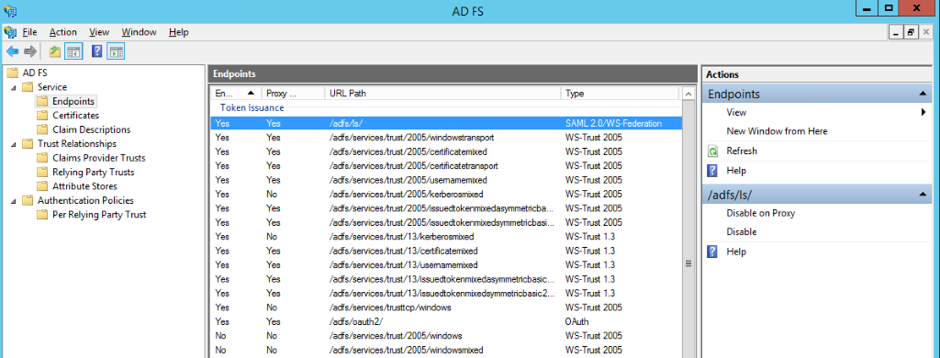
- To enter this information in your IdP Endpoint URL on the SAML settings page in eCase, once signed into eCase, go to the More menu on the eCase menu bar and click on the drop down arrow.
- Select the SAML Settings link under the Settings column. The SAML Settings page appears.
- To configure eCase to recognise your IdP, copy the Endpoint URL value and enter it in the IdP Endpoint URL field.
Back to Top
IdP Entity ID
To determine your IdP Entity ID, follow the steps below:
- Right click the AD FS folder in the AD FS management tool.
- Click Edit Federation Service Properties.
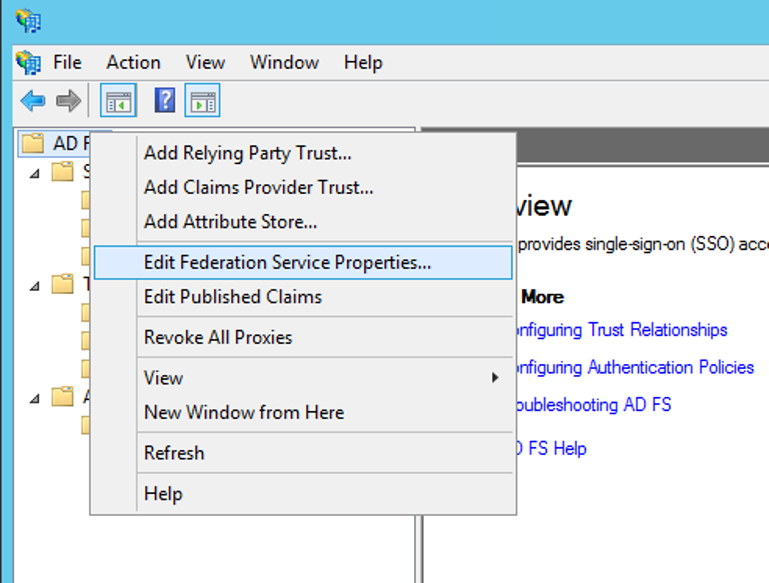
- Copy the value from Federation Service Identifier and paste it into the IdP Entity ID field in the SAML Settings screen in eCase.
Back to Top
IdP X.509 Certificate
To determine your IdP X.509 Certificate, follow the steps below:
- Navigate to the Cerficiates folder in the AD FS management tool.
- Locate the Token-Signing certificate and double click it.
- Click Details, Copy to file and use the wizard to export the certificate as a Base-64 encoded X.509 certificate.
- Open the exported certificate file in Notepad and copy the full value, including “----BEGIN CERTIFICATE-----” and “-----END CERTIFICATE------”
- Paste the value into the IdP X.509 Certificate field in the SAML Settings screen on eCase.
TIP Follow the instructions on the Test SAML Single Sign On Settings page prior to enabling SSO