
Print
Configure Attribute Claims
The next step is to configure AD FS to send user attributes to eCase in the correct format. To do this, follow the steps below:
- Right click the eCase Relying Party Trust in the AD FS management tool and select Edit Claim rules.
- Click Add rule.
- When prompted to choose a Claim rule template, select Send LDAP Attributes as claims and click Next.
- Configure the claim rule as follows:
Field Description Claim rule name Enter a name of your choice, for example, eCase claims Attribute store Select Active Directory Mapping of LDAP attributes to outgoing claim types Add four mappings:
LDAP Attribute Outgoing Claim Type objectGUID Name ID E-Mail-Addresses E-Mail Address Surname Surname Given-Name Given Name
NOTE the objectGUID option may not appear in the drop down list so must be entered manually.
The result should look like this: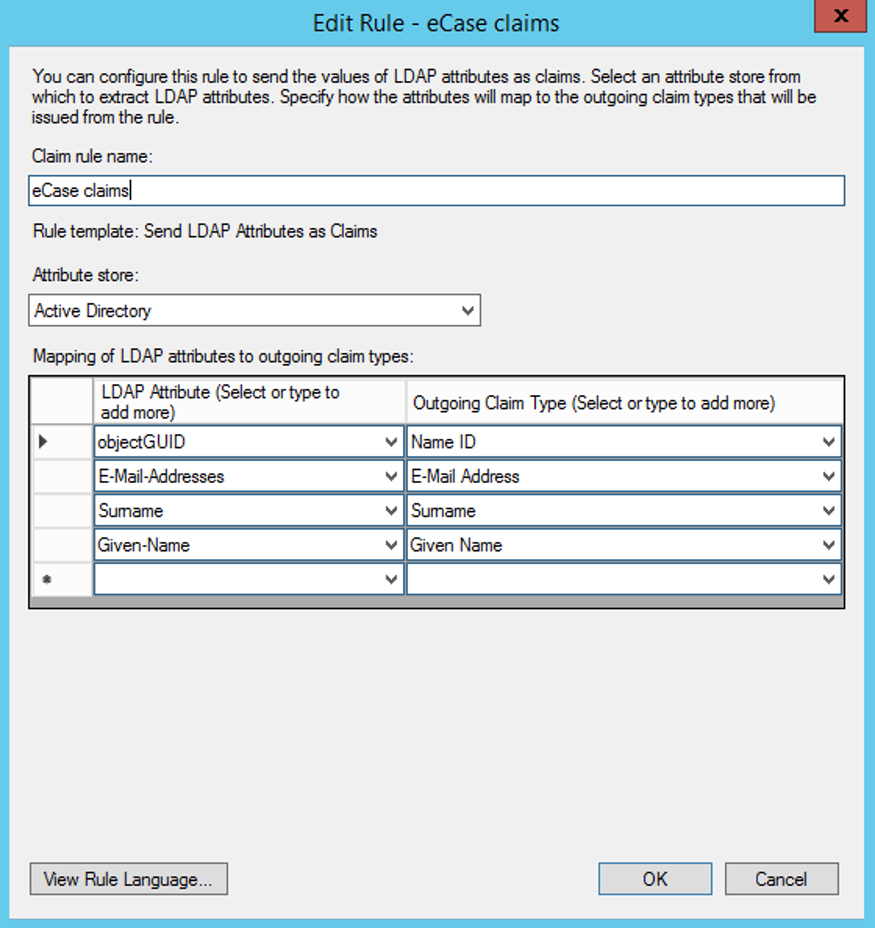
NOTE It is your responsibility to ensure that the Name ID is a unique, unchanging identifier for an individual user. eCase will create a duplicate account for a user if their Name ID changes.